

Field service schedules rarely go exactly as planned.
A technician may take longer than expected at a job. A customer may cancel at the last minute. An urgent service request may arrive. New work may need to be assigned across a team. Routes that looked efficient in the morning may no longer make sense by midday.
Each change can trigger another scheduling decision.
Microsoft is bringing AI agents into this process through the Scheduling Operations Agent in Dynamics 365 Field Service. Rather than requiring dispatchers to rearrange bookings one by one, the agent can evaluate scheduling options and suggest an improved schedule.
The opportunity is bigger than automating scheduling. It shows how AI agents can become part of an operational workflow where conditions, priorities, and decisions continuously change.
Field service schedules rarely stay static
Scheduling field technicians involves balancing several variables at once: available work, technician availability, skills, priorities, customer commitments, and travel.
Those variables also change throughout the day.
Microsoft identifies scenarios such as same-day cancellations, jobs running longer than planned, changes in work priority, backlogs of unscheduled work, and inefficient travel between bookings as situations where its Scheduling Operations Agent can help.
Consider a technician whose morning appointment runs longer than expected. Every subsequent booking may now need to be reconsidered.
Or a cancellation creates a gap in the schedule. The dispatcher needs to determine which open job could fill that time while considering factors such as priority, promised time, and travel.
The challenge isn’t creating the original schedule. It is continuously adapting that schedule as operating conditions change.
This is where agentic AI becomes relevant to field service.
What is the Dynamics 365 Scheduling Operations Agent?
The Scheduling Operations Agent is an AI agent in Dynamics 365 Field Service designed to help dispatchers optimize the schedules of one or more technicians.
When preparing a suggested schedule, the agent can examine existing bookings, unfulfilled requirements that meet the selected criteria, and relevant resource characteristics such as working hours and skills. The scheduling goal defines the objectives and constraints used to shape the recommendation.
Importantly, this does not have to remove the dispatcher from the decision.
For interactive optimization, the agent presents the existing and proposed schedules so the dispatcher can review the recommendation and either apply it or change the settings and try again.
That creates a useful operating model:
AI evaluates → AI recommends → dispatcher reviews → schedule changes
It introduces agentic decision support while keeping people involved in operational decisions.
Where can an AI agent add value in field service scheduling?
The value becomes clearer when we look at actual scheduling situations.
Filling gaps after cancellations
A same-day cancellation can leave a technician with unused capacity.
Instead of searching manually through open work, a dispatcher can use the agent to find work that could fit the open slot while considering factors such as priority, promised time, and travel proximity.
Responding when work runs late
If one booking takes longer than planned, the delay can affect every job that follows.
The dispatcher can use scheduling optimization to reconsider the technician’s remaining bookings instead of adjusting each booking manually.Responding to changing priorities
Schedules created earlier may no longer reflect the work that matters most.
Microsoft describes a scenario where lower-priority bookings can be reconsidered so recently emerged, higher-priority work can be moved forward.
Assigning unscheduled work
Scheduling becomes more complex when a backlog of work must be distributed across multiple technicians.
The agent can evaluate open requirements against eligible technicians and optimize work across a team rather than treating each booking as an isolated decision.
Improving travel between jobs
Technicians may have a full day of assigned work, but the sequence may create unnecessary travel.
The agent can reorder existing bookings to improve the route between jobs.
These scenarios illustrate an important point: agentic field service is most useful when applied to a defined operational decision, not simply added as another AI interface.
From dispatcher assistance to automated planning
Not every scheduling problem requires the same level of automation.
Microsoft currently supports two approaches through the Scheduling Operations Agent: interactive optimization and batch optimization.
Interactive optimization: respond to what is happening now
Interactive optimization is intended for targeted changes during the day.
A dispatcher can select up to five resources from Copilot, the schedule board, or a resource list and request a suggested schedule. The dispatcher reviews the proposed changes before applying them.
This lends itself to situations such as:
- a cancellation
- an unexpected delay
- urgent work arriving
- inefficient bookings across a small group of technicians
AI acts as a scheduling assistant while the dispatcher remains directly involved.
Batch optimization: plan across a wider operation
Batch optimization addresses larger scheduling requirements.
Microsoft allows teams to create scheduling plans by defining a scope, goal, and time range. Plans can be run on demand or on a recurring schedule. Results can be set for review before application, or proven configurations can be configured to apply automatically.
This creates a progression from:
Individual schedule adjustment → team optimization → repeatable scheduling plans → recurring optimization
That progression matters for organizations considering agentic operations. Automation does not need to begin with full autonomy.
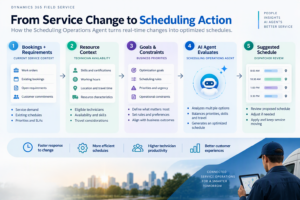
How does the agent make a scheduling recommendation?
The underlying process can be understood without treating AI as a black box.
At a high level:
Existing bookings + open requirements + resource context
↓
Scheduling goals and constraints
↓
Scheduling Operations Agent evaluates options
↓
Proposed schedule
↓
Review and application
For interactive optimizations, Microsoft says the agent examines existing bookings, qualifying unfulfilled requirements, and characteristics such as technician working hours and skills. A scheduling goal provides the objectives and constraints that shape the result.
This has an important implication for technical teams.
An AI agent cannot compensate for every weakness in the underlying service operation. Resource information, work requirements, scheduling rules, priorities, and operational data still need to represent how the business actually works.
The AI capability and the business process need to be designed together.
What technical teams need to plan for
Deploying agentic scheduling requires more than turning on an AI feature.
Environment readiness
Microsoft currently specifies prerequisites for the Scheduling Operations Agent, including supported versions of Dynamics 365 Field Service and Universal Resource Scheduling, administrator access, and enabled location and map settings.
Technical teams should therefore treat environment readiness as an explicit part of agent planning.
Resource and scheduling context
The agent uses operational information such as bookings, requirements, and technician characteristics to generate schedules. Microsoft specifically identifies working hours and skills among the resource characteristics it can consider.
That makes the quality and configuration of scheduling data important.
Before increasing automation, teams should ask:
- Are technician skills represented correctly?
- Are working hours current?
- Are scheduling priorities meaningful?
- Are work requirements captured consistently?
- Do optimization goals reflect the way the service organization actually operates?
These are solution-engineering questions as much as AI questions.
Security and roles
Microsoft requires appropriate roles before users can work with the agent, including Scheduling Operations Agent User or Administrator roles for relevant scenarios.
Agent adoption therefore needs to fit into the existing Dynamics 365 security and administration model.
Consumption and licensing
AI agents also introduce capacity and consumption considerations.
Microsoft states that the Scheduling Operations Agent and other Dynamics 365 Copilot and agent capabilities use Copilot Studio credits for AI interactions and tasks. For scheduling optimization, credit consumption varies with factors including the number of resources in an optimization request. Microsoft documents both prepaid capacity and pay-as-you-go approaches.
The October 2026 Dynamics365LicensingGuide similarly places Dynamics 365 agents within Microsoft’s wider licensing and Copilot Credits framework.
For technical teams, this means usage and capacity planning should be considered alongside architecture, security, and process design rather than after deployment.
Agentic Field Service is more than scheduling
Scheduling is one part of the larger field service process.
Dynamics 365 Field Service also covers capabilities around work orders, technician productivity, customer communications, service information, and connections with other business systems. Microsoft positions the application within a broader model involving AI agents, Copilot, IoT, Power Apps, and connected financial and inventory data.
This is important because an optimized schedule has limited value in isolation.
The service process also depends on questions such as:
- Does the technician have the right information about the work?
- Are resource skills and availability accurate?
- Is the required work clearly defined?
- Are changes reflected across the service operation?
- How will the completed service connect with downstream processes?
This is where solution engineering becomes critical.
The value of agentic field service comes from connecting the agent to a well-designed service process, reliable operational data, appropriate controls, and the wider Dynamics 365 environment.
AI should improve the workflow, not become another disconnected layer.
A practical path toward agentic scheduling
Organizations don’t need to begin with autonomous scheduling.
A more measured approach is to introduce agentic capabilities in stages.
Step 1: Identify the scheduling friction
Start with a defined operational problem.
Is the dispatcher spending significant time responding to cancellations? Is unscheduled work accumulating? Are schedules frequently disrupted by delays? Is route efficiency a recurring issue?
A specific problem gives the AI initiative a measurable purpose.
Step 2: Prepare the operational data
Review the information used to make scheduling decisions.
Resource availability, skills, requirements, priorities, existing bookings, and scheduling rules need to represent current operations.
Step 3: Start with interactive optimization
Use targeted scenarios where dispatchers can compare the current schedule with the agent’s recommendation.
This creates an opportunity to test how well the optimization goals reflect real operational priorities while keeping the dispatcher in control.
Step 4: Refine goals and constraints
Learn from the recommendations.
Do the proposed schedules align with the priorities dispatchers would normally consider? Which rules or data need adjustment?
The goal should be to develop a scheduling model that reflects the business, not simply enable more automation.
Step 5: Evaluate batch optimization
Once the underlying model is reliable, explore broader optimization across teams, territories, or planning periods.
Step 6: Automate proven patterns
Microsoft’s current direction supports running validated scheduling plans on a recurring basis. This provides a path from targeted dispatcher assistance toward more repeatable automated planning.
The principle is simple:
Prove the decision model before automating the decision process.
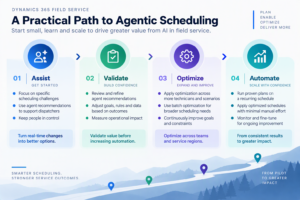
What should organizations consider before production adoption?
There is an important qualification to Microsoft’s current agent capabilities.
The Scheduling Operations Agent is currently documented as a preview feature. Microsoft states that preview features aren’t intended for production use, may have restricted functionality, and are made available early so customers can evaluate them and provide feedback.
Organizations exploring the capability should therefore assess:
- current feature and regional availability
- supported scheduling scenarios and limitations
- environment and version prerequisites
- roles and permissions
- Copilot credit consumption
- resource and scheduling data quality
- optimization goals and constraints
- appropriate human oversight
The objective during preview should not be to maximize automation.
It should be to understand where agentic scheduling can create value, what operational conditions it depends on, and what controls are needed before increasing autonomy.
Agentic field service starts with the workflow
The most useful way to think about agentic field service is not to ask:
“Where can we add an AI agent?”
Start instead with:
“Which service decisions consume time, change frequently, and can benefit from better operational context?”
Scheduling provides a strong example.
Cancellations, delays, new priorities, open work, resource availability, and travel continually change the plan. AI agents provide a way to evaluate those changes and help service teams respond more efficiently.
But the agent is only one part of the solution.
Organizations still need well-designed field service processes, reliable data, appropriate Dynamics 365 architecture, clear optimization goals, security, governance, and a thoughtful approach to automation.
That is where agentic field service becomes more than an AI feature.
It becomes solution engineering around the service operation itself.
How a Unified Platform Transforms Fragmented Field Service Into One Connected Operation